How to Show Year Progress on Your Lock Screen
See how much of the year has passed as a simple reminder to make the most of your time.

For those who want a greater sense of urgency to make the most of their time, seeing how much of the year has passed on your Lock Screen can serve as a simple reminder.
It might even make you think twice before spending another hour mindlessly scrolling on your phone.
Here's how to add a year progress percentage to your iPhone Lock Screen.
1. Download Life Dots
First, download our app Life Dots from the App Store.

2. Customize your Lock Screen
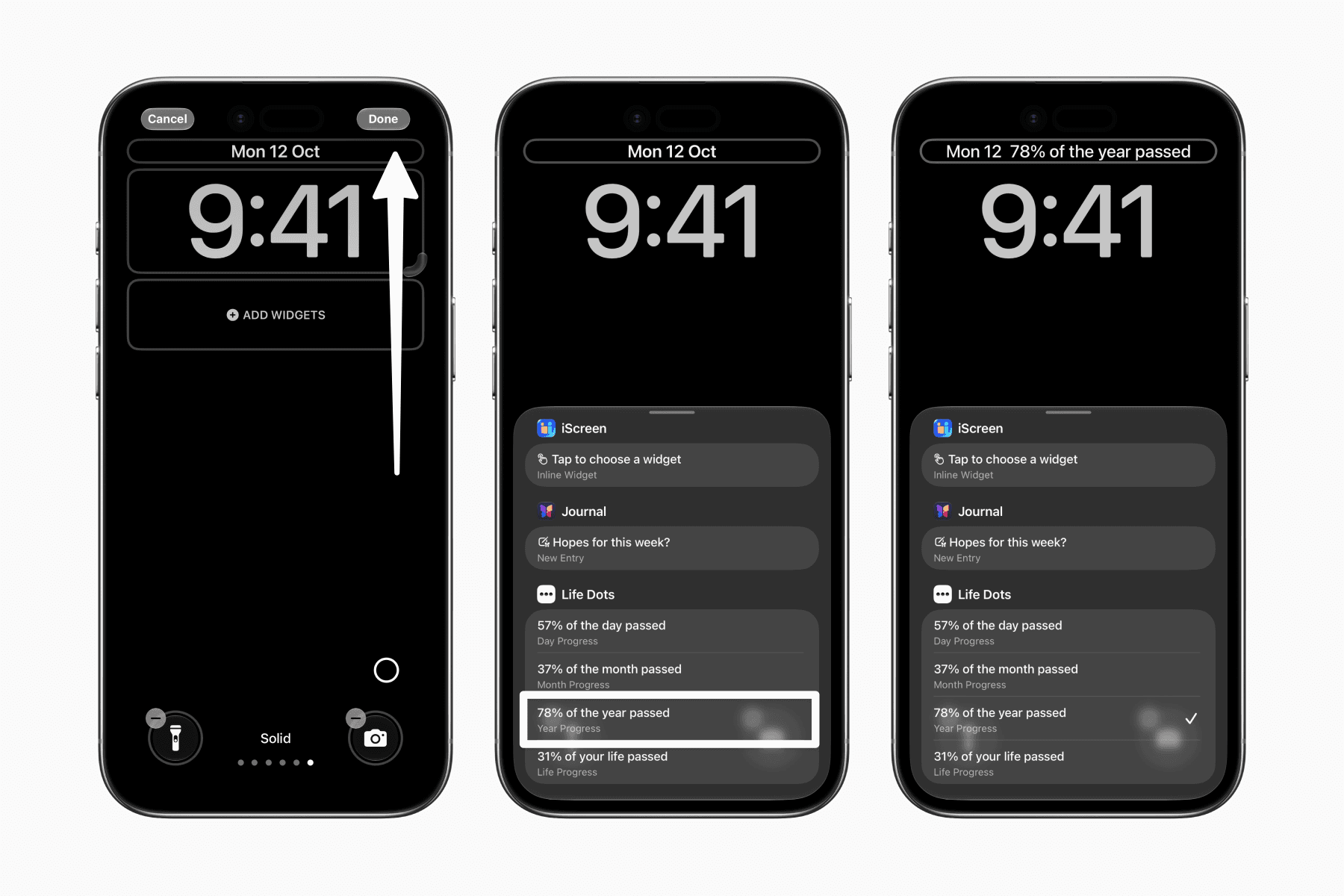
Go to your Lock Screen and press and hold an empty area until the Customize button appears.
Tap Customize to enter editing mode, where the editable elements are highlighted with borders.

3. Add the year progress widget
Tap the date above the clock to open the list of widgets you can add beside it.
Widgets are listed alphabetically by app name. Scroll down to Life Dots and select the widget that shows the percentage of the year that has passed.
4. Save your Lock Screen
Tap anywhere outside the widget selection panel to dismiss it, then tap Done in the top-right corner to save your changes.

Now you can see how much of the year has passed whenever you check your Lock Screen, serving as a small reminder to make the most of your time.