How to customize iOS 27 and iPadOS 27 wallpaper
The new wallpaper includes a color option that lets you better match your iPhone or iPad setup.

Note: At the time of writing, this feature appears in the iOS 27 Developer Beta 1 and may change before the public release.
As expected, Apple has introduced a new wallpaper alongside iOS 27 and iPadOS 27.
The wallpaper looks great out of the box, but those who prefer a minimalist setup will be happy to know it can be customized with a color of your choice.
Whether you prefer monochrome tones or a specific accent color, here's how to make the wallpaper fit your setup.
How to customize the wallpaper
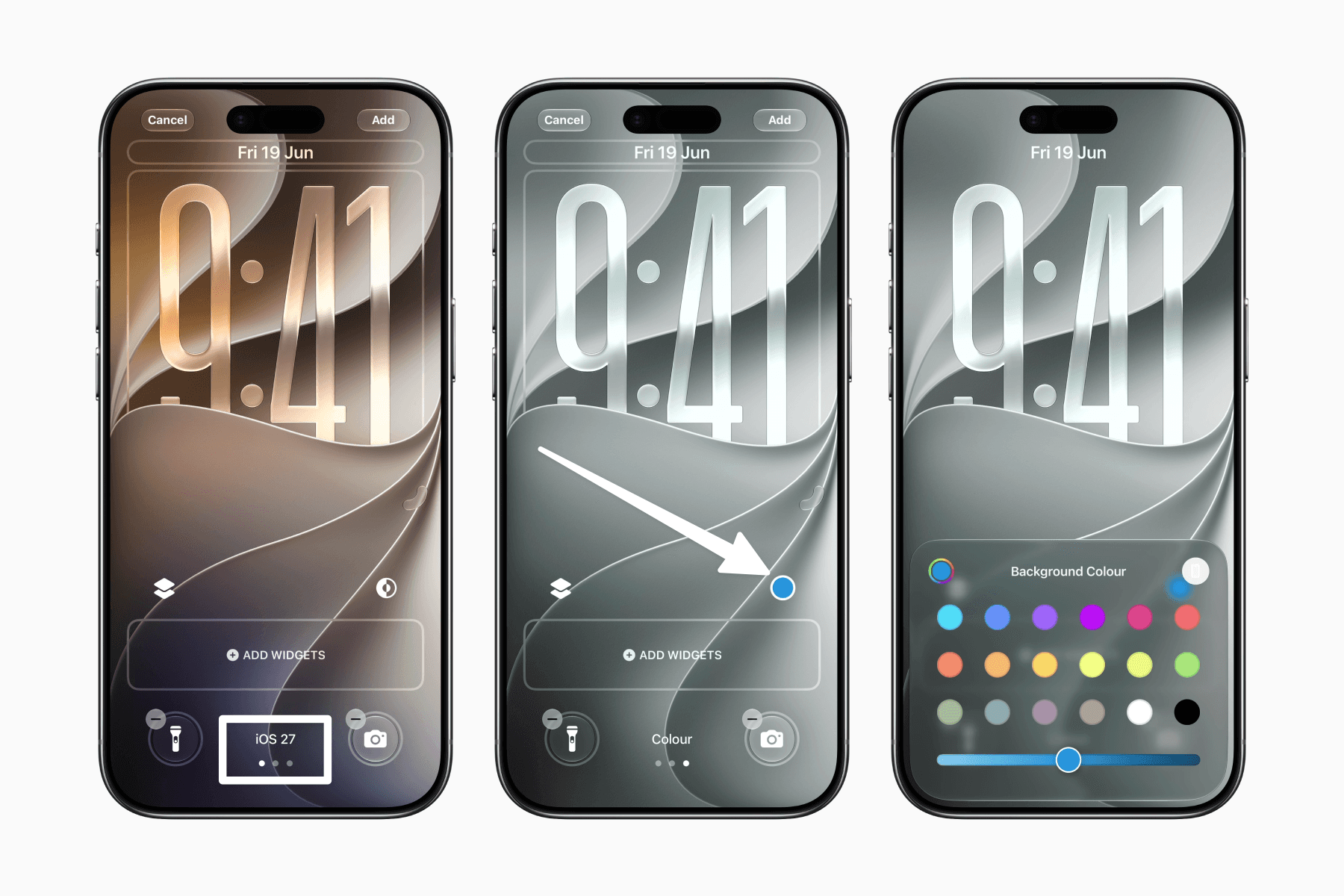
Edit or add the new wallpaper.
Swipe to the Color style.
Tap the color picker button.
Choose your preferred background color.
Final thoughts
It's a small customization option, but one that makes it easier to enjoy Apple's latest wallpaper while keeping a consistent setup.